>>roll, pitch, yaw
mpu6050 i2c 인터페이스.
>> 지그비 개요
Zigbee는 왜 필요한가?
지그비 소개
지그비 특징
01.저전력 소모, 간단한 구현
02.한번의 배터리 충전으로 수 개월, 또는 수년간 사용 가능
03.활성 모드(수신, 송신), 슬립 모드를 가짐.
04.디바이스, 설치, 유지 등 모두 상대적으로 낮은 비용으로 가능
05.안전성(보안성)
06.신뢰성
07.유연성
08.매우 작은 프로토콜 스택
09.상호 호환가능 및 어느 곳에서나 사용 가능
10.네트워크당 높은 노트 밀집(지그비의 IEEE 802.15.4 사용은 네트워크에서 많은 디바이스를 다루는 것을 가능케 함. 이러한 특징으로 방대한 센서 배열과 네트워크의 통제가 가능)
11.간단한 프로토콜, 국제적으로 구현(지그비 프로토콜 스택 코드의 크기는 블루투스나 802.11의 사이즈에 비해 4분의 1 정도에 불과하다.)
지그비의 사용분야
□ 스마트 에너지
□ 홈 엔터테인먼트와 제어
□ 홈 인식 시스템
□ 모바일 서비스
□ 상업 빌딩
□ 산업용 공장
지그비 디바이스 타입
□ 지그비 코디네이터
□ 지그비 라우터
□ 지그비 엔드 디바이스

지그비 스택

802.15.4
지그비
애플리케이션/프로파일
지그비는 다음과 같은 프로파일을 지원한다.
지그비 스택 비교
| Feature | ZigBee 2006 | ZigBee 2007 | ZigBee Pro |
| Size in ROM/RAM | Smallest | Small | Bigger |
| Stack Profile | 0x01 | 0x01 | 0x02 |
| Maximum hops | 10 | 10 | 30 |
| Maximum nodes in network | 31,101 | 31,101 | 65,540 |
| Mesh Networking | Yes | Yes | Yes |
| Broadcasting | Yes | Yes | Yes |
| Tree routing | Yes | Yes | No |
| Frequency Agility | No | Yes | Yes |
| Bandwidth used by Protocol | Least | More | Most |
| Fragmentation | No | Yes | Yes |
| Multicasting | No | No | Yes |
| Source routing | No | No | Yes |
| Symmetric Links | No | No | Yes |
| Standard Security (AES 128 bit) | Yes | Yes | Yes |
| High Security (SKKE) | No | No | Yes |
| Profiles support | Home Automation | Home Automation | Home Automation Smart Energy Commercial Building Industrial Plant Monitor |
지그비 2006, 지그비 2007, 지그비 프로의 호환성
지그비, Wi-Fi, 블루투스 비교
| ZigBee | Wi-Fi | Bluetooth | |
| Application | Monitoring and Control | Email, Web, Video | Cable replacement |
| Physical/ MAC layers | IEEE 802.15.4 | IEEE 802.11 | IEEE 802.15.1 |
| Data Rate | 250 Kbits/s | 11 & 54 Mbits/sec | 1 Mbits/s |
| Range | 10-100 meters | 50-100 meters | 10 meters |
| Networking Topology | Mesh | Point to hub | Ad-hoc, very small networks |
| Operating Frequency | 2.4 GHz | 2.4 and 5 GHz | 2.4 GHz |
| Complexity (Device and application impact) | Low | High | High |
| Power Consumption | low | High | Medium |
| Number of devices for Network | 64K | 32 per access point | 7 |
| Network Latency New slave enumeration |
30 ms | - | 20 sec |
| Network Latency Sleeping slave changing to active |
Devices can join an existing network in under 30ms | Device connection requires 3-5 seconds | Device connection requires up to 10 seconds |
| Typical Applications | Industrial control and monitoring, sensor networks, building automation, home control and automation, toys, games | Wireless LAN connectivity, broadband Internet access | Wireless connectivity between devices such as phones, PDA, laptops, headsets |
>> DFPlayer Mini MP3 Player
| Power supply | 3.2 – 5.0 V |
| Current consumption (standby) | ~ 20 mA |
| Supported file types | MP3 and WAV |
| Supported SD cards | Micro SD(HC) up to 32 GB |
| Format | FAT16 / FAT 32 |
| Communication | Seriell RX/TX, baud rate: 9600 |
| USB port | USB 2.0 (Flashdrive / PC) |
| Audio outputs | Loudspeaker – up to 3W (amplifier on board) DAC (for headphones or amplifiers) |
핀아웃
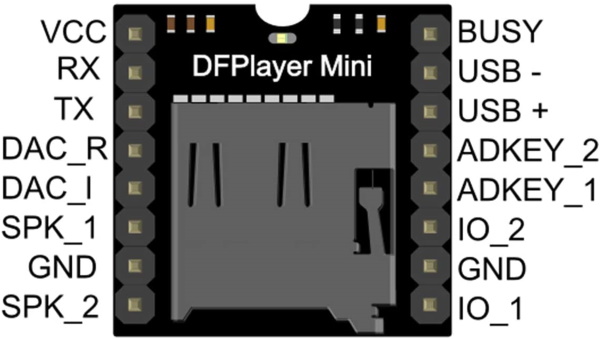


>> Example Code.
https://github.com/DFRobot/DFRobotDFPlayerMini
/***************************************************
 Modified (by Wolfgang Ewald) Version of the FullFunction.ino example sketch of the DFRobotDFPlayerMini library:

 DFPlayer - A Mini MP3 Player For Arduino
 <https://www.dfrobot.com/product-1121.html>

 ***************************************************
 This example shows the all the function of library for DFPlayer.

 Created 2016-12-07
 By [Angelo qiao](Angelo.qiao@dfrobot.com)

 GNU Lesser General Public License.
 See <http://www.gnu.org/licenses/> for details.
 All above must be included in any redistribution
 ****************************************************/

/***********Notice and Trouble shooting***************
 1.Connection and Diagram can be found here
<https://www.dfrobot.com/wiki/index.php/DFPlayer_Mini_SKU:DFR0299#Connection_Diagram>
 2.This code is tested on Arduino Uno, Leonardo, Mega boards.
 ****************************************************/

#include "Arduino.h"
#include "SoftwareSerial.h"
#include "DFRobotDFPlayerMini.h"

SoftwareSerial mySoftwareSerial(10,11); // RX, TX
DFRobotDFPlayerMini myDFPlayer;
void printDetail(uint8_t type, int value);

void setup()
{
  mySoftwareSerial.begin(9600);
  Serial.begin(9600);

  Serial.println();
  Serial.println(F("DFRobot DFPlayer Mini Demo"));
  Serial.println(F("Initializing DFPlayer ... (May take 3~5 seconds)"));

  if (!myDFPlayer.begin(mySoftwareSerial)) {  //Use softwareSerial to communicate with mp3.
    Serial.println(F("Unable to begin:"));
    Serial.println(F("1.Please recheck the connection!"));
    Serial.println(F("2.Please insert the SD card!"));
    while(true);
  }
  Serial.println(F("DFPlayer Mini online."));
  printHelp();

  myDFPlayer.setTimeOut(500); //Set serial communictaion time out 500ms

  //----Set volume----
  myDFPlayer.volume(10);  //Set volume value (0~30).
 // myDFPlayer.volumeUp(); //Volume Up
 // myDFPlayer.volumeDown(); //Volume Down

  //----Set different EQ----
  myDFPlayer.EQ(DFPLAYER_EQ_NORMAL);
//  myDFPlayer.EQ(DFPLAYER_EQ_POP);
//  myDFPlayer.EQ(DFPLAYER_EQ_ROCK);
//  myDFPlayer.EQ(DFPLAYER_EQ_JAZZ);
//  myDFPlayer.EQ(DFPLAYER_EQ_CLASSIC);
//  myDFPlayer.EQ(DFPLAYER_EQ_BASS);

  //----Set device we use SD as default----
//  myDFPlayer.outputDevice(DFPLAYER_DEVICE_U_DISK);
  myDFPlayer.outputDevice(DFPLAYER_DEVICE_SD);
//  myDFPlayer.outputDevice(DFPLAYER_DEVICE_AUX);
//  myDFPlayer.outputDevice(DFPLAYER_DEVICE_SLEEP);
//  myDFPlayer.outputDevice(DFPLAYER_DEVICE_FLASH);

  //----Mp3 control----
//  myDFPlayer.sleep();     //sleep
//  myDFPlayer.reset();     //Reset the module
//  myDFPlayer.enableDAC();  //Enable On-chip DAC
//  myDFPlayer.disableDAC();  //Disable On-chip DAC
//  myDFPlayer.outputSetting(true, 15); //output setting, enable the output and set the gain to 15


}

void loop(){
  if(Serial.available()){
    readCommand();
  }

  if (myDFPlayer.available()) {
    printDetail(myDFPlayer.readType(), myDFPlayer.read()); //Print the detail message from DFPlayer to handle different errors and states.
  }
}

void readCommand(){
  char cmd = ' ';
  int value1, value2 = 0;
  cmd = Serial.read();
  value1 = Serial.parseInt();
  value2 = Serial.parseInt();

  switch(cmd){
    case 'h':
      printHelp();
      break;

    case '>':
      myDFPlayer.next();
      break;

    case '<':
      myDFPlayer.previous();
      break;

    case 'p':
      if(value2 == 0) myDFPlayer.play(value1);
      else if(value1 != 0) myDFPlayer.playFolder(value1, value2);
      break;

    case 'P':
      if(value2 == 0) myDFPlayer.playMp3Folder(value1);
      else if(value1 != 0)myDFPlayer.playLargeFolder(value1, value2);
      break;

    case '+':
      myDFPlayer.volumeUp();
      break;

    case '-':
      myDFPlayer.volumeDown();
      break;

    case 'v':
      myDFPlayer.volume(value1);
      break;

    case 'b':
      myDFPlayer.pause();
      break;

    case 's':
      myDFPlayer.start();
      break;

    case 'z':
      myDFPlayer.sleep();
      break;

    case 'L':
      if(value1 == 0) myDFPlayer.enableLoopAll();
      else myDFPlayer.loopFolder(value1);
      break;

    case 'l':
      if(value1 == 0) myDFPlayer.disableLoopAll();
      else myDFPlayer.loop(value1);
      break;

    case 'A':
      myDFPlayer.advertise(value1);
      break;

    case 'a':
      myDFPlayer.stopAdvertise();
      break;

    case 'q':
      if(value1 == 1) Serial.println(myDFPlayer.readState());
      else if(value1 == 2) Serial.println(myDFPlayer.readVolume());
      else if(value1 == 3) Serial.println(myDFPlayer.readEQ());
      else if(value1 == 4) Serial.println(myDFPlayer.readFileCounts());
      else if(value1 == 5) Serial.println(myDFPlayer.readFolderCounts());
      else if(value1 == 6) Serial.println(myDFPlayer.readCurrentFileNumber());
      break;
    default:
      Serial.println("Ungültiges Kommando");
      break;
  }

}

void printHelp(){
  Serial.println("DFPlayer Commands:");
  Serial.println(" h - help");
  Serial.println(" > - next ");
  Serial.println(" < - previous");
  Serial.println(" p3 - play");
  Serial.println(" p3,5 - play folder 3, file 5");
  Serial.println(" P3,5 - play large folder 3, file 5");
  Serial.println(" P3 - play file 3 in MP3 folder");
  Serial.println(" + - volume up");
  Serial.println(" - - volume down");
  Serial.println(" v10 - set volume to 10");
  Serial.println(" b - Pause");
  Serial.println(" s - start ");
  Serial.println(" z - sleep ");
  Serial.println(" L - enable loop all");
  Serial.println(" l - disable loop all");
  Serial.println(" L3 - loop folder 3");
  Serial.println(" l3 - loop file 3");
  Serial.println(" A3 - advertise file 3");
  Serial.println(" a - stop advertise ");
  Serial.println(" qx - query No. x");
  Serial.println("     x = 1 - read state");
  Serial.println("     x = 2 - read volume");
  Serial.println("     x = 3 - read equalizer");
  Serial.println("     x = 4 - read file counts");
  Serial.println("     x = 5 - read current file number");
  Serial.println("     x = 6 - read file counts in folder");
  Serial.println("     x = 7 - read folder counts");
}

void printDetail(uint8_t type, int value){
  switch (type) {
    case TimeOut:
      Serial.println(F("Time Out!"));
      break;
    case WrongStack:
      Serial.println(F("Stack Wrong!"));
      break;
    case DFPlayerCardInserted:
      Serial.println(F("Card Inserted!"));
      break;
    case DFPlayerCardRemoved:
      Serial.println(F("Card Removed!"));
      break;
    case DFPlayerCardOnline:
      Serial.println(F("Card Online!"));
      break;
    case DFPlayerUSBInserted:
      Serial.println("USB Inserted!");
      break;
    case DFPlayerUSBRemoved:
      Serial.println("USB Removed!");
      break;
    case DFPlayerPlayFinished:
      Serial.print(F("Number:"));
      Serial.print(value);
      Serial.println(F(" Play Finished!"));
      break;
    case DFPlayerError:
      Serial.print(F("DFPlayerError:"));
      switch (value) {
        case Busy:
          Serial.println(F("Card not found"));
          break;
        case Sleeping:
          Serial.println(F("Sleeping"));
          break;
        case SerialWrongStack:
          Serial.println(F("Get Wrong Stack"));
          break;
        case CheckSumNotMatch:
          Serial.println(F("Check Sum Not Match"));
          break;
        case FileIndexOut:
          Serial.println(F("File Index Out of Bound"));
          break;
        case FileMismatch:
          Serial.println(F("Cannot Find File"));
          break;
        case Advertise:
          Serial.println(F("In Advertise"));
          break;
        default:
          break;
      }
      break;
    default:
      break;
  }
}
Not all pins on the Mega and Mega 2560 support change interrupts,
so only the following can be used for RX:
10, 11, 12, 13, 50, 51, 52, 53, 62, 63, 64, 65, 66, 67, 68, 69
TX: any.

