5/18/2014

OV7670 Pin Map

OV7670 CAMERA 

Arduino ov7670 reference.

http://www.arducam.com/download/

16 pin module.
http://emartee.com/product/41908/

20 pin ? other module.

http://forum.arduino.cc/index.php?PHPSESSID=ltg6b5m1pr6qs956c93k66qc42&topic=159557.0
https://gist.github.com/youngsoonpark/ed893de73026a450b99f
DescriptionNameOV7670 pin
VCC+V1
GroundGND2
SCCB CLKSCL3
SCCB DataSDA4
Vertical synchronizationVSYNC5
Line synchronizationHREF6
FIFO Write EnableWEN7
XCKXCK8
FIFO read address resetRRST9
FIFO chip enableOE10
FIFO read clockRCLK11
GroundGND12
FIFO output dataD013
FIFO output dataD114
FIFO output dataD215
FIFO output dataD316
FIFO output dataD417
FIFO output dataD518
FIFO output dataD619
FIFO output dataD720

5/09/2014

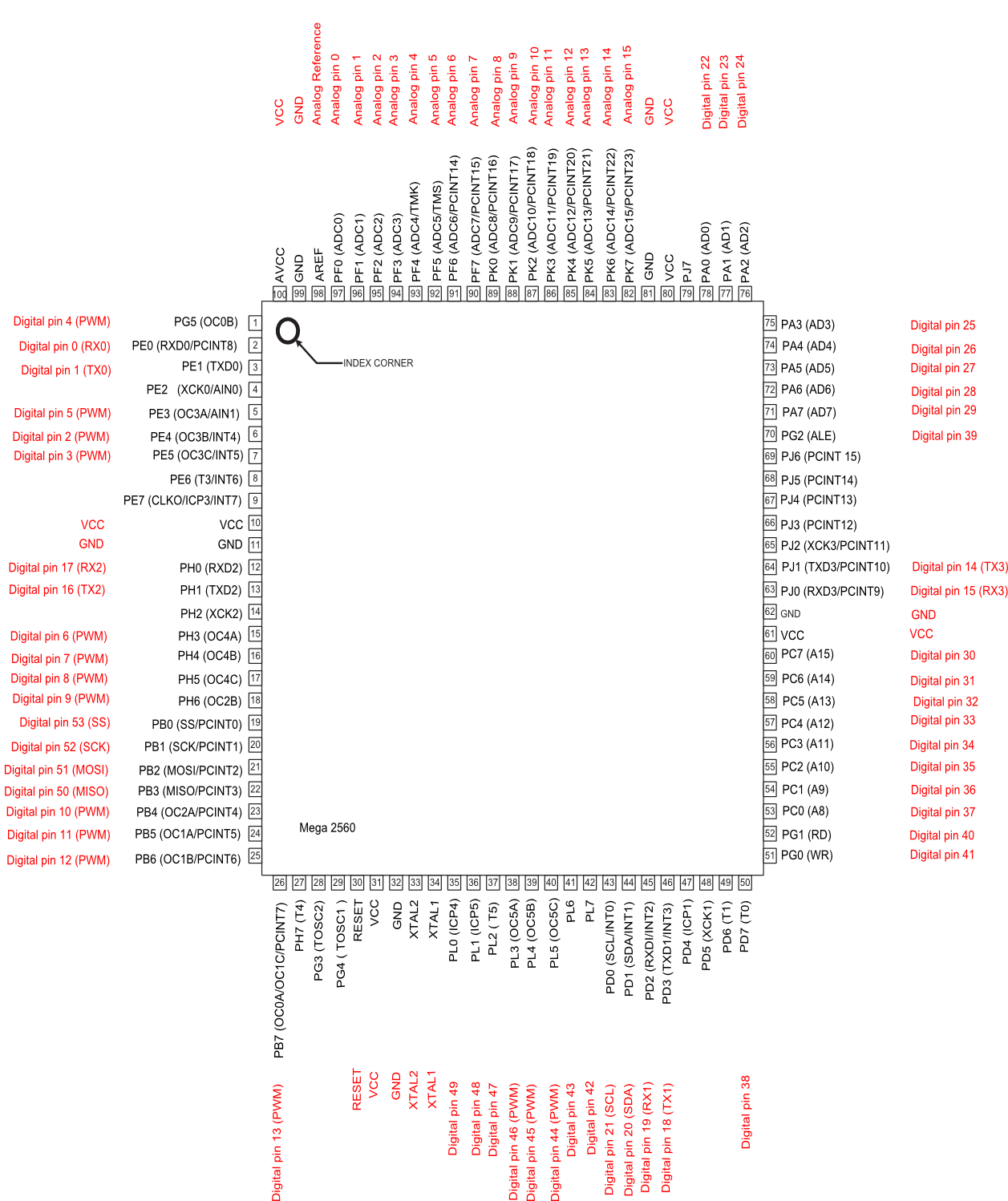
Arduino Mega 2560 pin map


ATmega2560-Arduino Pin Mapping

Below is the pin mapping for the Atmega2560. The chip used in Arduino 2560. There are pin mappings to Atmega8 and Atmega 168/328 as well.

Arduino Mega 2560 PIN diagram


The source SVG file is also available for download: PinMapping2560.zip

Arduino Mega 2560 PIN mapping table

Pin NumberPin NameMapped Pin Name
1PG5 ( OC0B )Digital pin 4 (PWM)
2PE0 ( RXD0/PCINT8 )Digital pin 0 (RX0)
3PE1 ( TXD0 )Digital pin 1 (TX0)
4PE2 ( XCK0/AIN0 ) 
5PE3 ( OC3A/AIN1 )Digital pin 5 (PWM)
6PE4 ( OC3B/INT4 )Digital pin 2 (PWM)
7PE5 ( OC3C/INT5 )Digital pin 3 (PWM)
8PE6 ( T3/INT6 ) 
9PE7 ( CLKO/ICP3/INT7 ) 
10VCCVCC
11GNDGND
12PH0 ( RXD2 )Digital pin 17 (RX2)
13PH1 ( TXD2 )Digital pin 16 (TX2)
14PH2 ( XCK2 ) 
15PH3 ( OC4A )Digital pin 6 (PWM)
16PH4 ( OC4B )Digital pin 7 (PWM)
17PH5 ( OC4C )Digital pin 8 (PWM)
18PH6 ( OC2B )Digital pin 9 (PWM)
19PB0 ( SS/PCINT0 )Digital pin 53 (SS)
20PB1 ( SCK/PCINT1 )Digital pin 52 (SCK)
21PB2 ( MOSI/PCINT2 )Digital pin 51 (MOSI)
22PB3 ( MISO/PCINT3 )Digital pin 50 (MISO)
23PB4 ( OC2A/PCINT4 )Digital pin 10 (PWM)
24PB5 ( OC1A/PCINT5 )Digital pin 11 (PWM)
25PB6 ( OC1B/PCINT6 )Digital pin 12 (PWM)
26PB7 ( OC0A/OC1C/PCINT7 )Digital pin 13 (PWM)
27PH7 ( T4 ) 
28PG3 ( TOSC2 ) 
29PG4 ( TOSC1 ) 
30RESETRESET
31VCCVCC
32GNDGND
33XTAL2XTAL2
34XTAL1XTAL1
35PL0 ( ICP4 )Digital pin 49
36PL1 ( ICP5 )Digital pin 48
37PL2 ( T5 )Digital pin 47
38PL3 ( OC5A )Digital pin 46 (PWM)
39PL4 ( OC5B )Digital pin 45 (PWM)
40PL5 ( OC5C )Digital pin 44 (PWM)
41PL6Digital pin 43
42PL7Digital pin 42
43PD0 ( SCL/INT0 )Digital pin 21 (SCL)
44PD1 ( SDA/INT1 )Digital pin 20 (SDA)
45PD2 ( RXDI/INT2 )Digital pin 19 (RX1)
46PD3 ( TXD1/INT3 )Digital pin 18 (TX1)
47PD4 ( ICP1 ) 
48PD5 ( XCK1 ) 
49PD6 ( T1 ) 
50PD7 ( T0 )Digital pin 38
51PG0 ( WR )Digital pin 41
52PG1 ( RD )Digital pin 40
53PC0 ( A8 )Digital pin 37
54PC1 ( A9 )Digital pin 36
55PC2 ( A10 )Digital pin 35
56PC3 ( A11 )Digital pin 34
57PC4 ( A12 )Digital pin 33
58PC5 ( A13 )Digital pin 32
59PC6 ( A14 )Digital pin 31
60PC7 ( A15 )Digital pin 30
61VCCVCC
62GNDGND
63PJ0 ( RXD3/PCINT9 )Digital pin 15 (RX3)
64PJ1 ( TXD3/PCINT10 )Digital pin 14 (TX3)
65PJ2 ( XCK3/PCINT11 ) 
66PJ3 ( PCINT12 ) 
67PJ4 ( PCINT13 ) 
68PJ5 ( PCINT14 ) 
69PJ6 ( PCINT 15 ) 
70PG2 ( ALE )Digital pin 39
71PA7 ( AD7 )Digital pin 29
72PA6 ( AD6 )Digital pin 28
73PA5 ( AD5 )Digital pin 27
74PA4 ( AD4 )Digital pin 26
75PA3 ( AD3 )Digital pin 25
76PA2 ( AD2 )Digital pin 24
77PA1 ( AD1 )Digital pin 23
78PA0 ( AD0 )Digital pin 22
79PJ7 
80VCCVCC
81GNDGND
82PK7 ( ADC15/PCINT23 )Analog pin 15
83PK6 ( ADC14/PCINT22 )Analog pin 14
84PK5 ( ADC13/PCINT21 )Analog pin 13
85PK4 ( ADC12/PCINT20 )Analog pin 12
86PK3 ( ADC11/PCINT19 )Analog pin 11
87PK2 ( ADC10/PCINT18 )Analog pin 10
88PK1 ( ADC9/PCINT17 )Analog pin 9
89PK0 ( ADC8/PCINT16 )Analog pin 8
90PF7 ( ADC7 )Analog pin 7
91PF6 ( ADC6 )Analog pin 6
92PF5 ( ADC5/TMS )Analog pin 5
93PF4 ( ADC4/TMK )Analog pin 4
94PF3 ( ADC3 )Analog pin 3
95PF2 ( ADC2 )Analog pin 2
96PF1 ( ADC1 )Analog pin 1
97PF0 ( ADC0 )Analog pin 0
98AREFAnalog Reference
99GNDGND
100

5/07/2014

rfcomm server example c linux

$ gcc rfcomm-server.c -lbluetooth
$ ./a.out


#include
#include
#include
#include
#include

int main(int argc, char **argv)
{
    struct sockaddr_rc loc_addr = { 0 }, rem_addr = { 0 };
    char buf[1024] = { 0 };
    int s, client, bytes_read;
    socklen_t opt = sizeof(rem_addr);

    // allocate socket
    s = socket(AF_BLUETOOTH, SOCK_STREAM, BTPROTO_RFCOMM);

    // bind socket to port 1 of the first available
    // local bluetooth adapter
    loc_addr.rc_family = AF_BLUETOOTH;
    loc_addr.rc_bdaddr = *BDADDR_ANY;
    loc_addr.rc_channel = (uint8_t) 15;
    bind(s, (struct sockaddr *)&loc_addr, sizeof(loc_addr));

    // put socket into listening mode
    listen(s, 1);
    client=0;    // initialize connection handle.
    while(1)
    {  
            if( client == 0 )
            {
            // accept one connection
            printf("accept wait\n");
            client = accept(s, (struct sockaddr *)&rem_addr, &opt);
            printf("now accept %d\n",client);
 
            ba2str( &rem_addr.rc_bdaddr, buf );
            fprintf(stderr, "accepted connection from %s\n", buf);
            memset(buf, 0, sizeof(buf));
            }
 
            // read data from the client
            bytes_read = read(client, buf, sizeof(buf));
            if( bytes_read > 0 )
            {
                printf("received [%s]\n", buf);
            }
            else
            if( bytes_read < 0 )
            {
                close(client);
                client=0;
                printf("close connection\n");
            }
            printf("bytes_read [%d]\n",bytes_read);
    }

    // close connection
    close(client);
    close(s);
    return 0;
}


5/02/2014

Bitwise Tips and Tricks - From


Below from http://www.opensourceforu.com/2012/06/power-programming-bitwise-tips-tricks/

Bitwise Tips and Tricks
If you are a seasoned programmer, these tips and tricks will seem very familiar, and are probably already part of your repertoire. If you are a novice programmer or a student, they should help you experience an “Aha!” moment. Independent of what you currently do, these tips and tricks will remind you of the wonderful discoveries in computer science, and the brilliant men and women behind them.
Before we get started, let’s establish some conventions for the rest of the article. Figure 1 shows how we represent bits — we start from right to left. The rightmost bit is the “Least Significant Bit” (LSB), and labelled as b0. The “Most Significant Bit” (MSB) is labelled b7. We use 8 bits to indicate and demonstrate concepts. The concept, however, is generically applicable to 32, 64, and even more bits.
Typical bit-wise representation
Figure 1: Typical bit-wise representation

Population count

Population count refers to the number of bits that are set to 1. Typical uses of population counting are:
  • Single-bit parity generation and detection: To generate the correct parity bit, depending on the scheme being followed (odd or even parity), one would need to count the number of bits set to 1, and generate the corresponding bit for parity. Similarly, to check the parity of a block of bits, we would need to check the number of 1s, and validate the block against the expected parity setting.
  • Hamming weight: Hamming weight is used in several fields, ranging from cryptography to information theory. The hamming distance between two strings A and B can be computed as the hamming weight of “A” XOR “B”.
These are just a few of the use cases of population counting; we cannot hope to cover all possible use cases, but rather, just explore a few samples.

First implementation

Our first implementation is the most straightforward:
int count_ones(int num)
{
  int count = 0;
  int mask = 0x1;
  while (num) {
    if (num & mask)
      count++;
    num >>= 1;
  }
  return count;
}
The code creates a mask bit, which is the number 1. The number is then shifted right, one at a time, and checked to see if the bit just shifted to the rightmost bit (LSB), is set. If so, the count is incremented. This technique is rather rudimentary, and has a cost complexity of O(n), where n is the number of bits in the block under consideration.

Improving the algorithm

For those familiar with design techniques like divide and conquer, the idea below is a classical trick called the “Gillies-Miller method for sideways addition”. This process is shown in Figure 2.
Divide and conquer the summation of bits
Figure 2: Divide and conquer the summation of bits
As the name suggests, this method involves splitting the bits to count; we start by pairing adjacent bits, and summing them. The trick, though, is that we store the intermediate result in the same location as the original number, without destroying the data required in the next step. The code for the procedure is shown below:
static inline unsigned char bit_count(unsigned char x)
{
  x = (0x55 & x) + (0x55 & (x >> 1));
  x = (0x33 & x) + (0x33 & (x >> 2));
  x = (0x0f & x) + (0x0f & (x >> 4));
  return x;
}
The key points to note for this algorithm are:
  • It uses a mask at each step in the algorithm.
  • The code takes O(log n) time to complete.
The masks at each step are shown in Figure 3.
Masks to divide and conquer summation
Figure 3: Masks to divide and conquer summation
The masks in the first step have alternate bits set (0×55); this selects alternate bits for summation. The number above is summed with the same mask (0×55), but with the entire number shifted right by one bit. In effect, this sums the alternate bits of the word. The bits that are not important are cleared, and set to 0 in the mask.
This procedure is repeated; the goal now is to compute the sum of the intermediate result obtained in the step above. The previous step counted the sum of alternate bits; it is now time to sum two bits at a time. The corresponding mask for this step is 0×33 (can you see why?). Again, we repeat the procedure by masking the number with 0×33, and adding to it the result of the number right-shifted by 2 and masked by 0×33. We do something similar in the final step, where we need to count 4 bits at a time, and sum up the result to obtain the final answer.
Figure 2 shows a sample computation for the number 177, which is represented as 10110001.
In Step 1, we sum the adjacent bits, leading to 01100001 (the sum of 1 and 0 is 01, the sum of 1 and 1 is 10 (in binary, this represents 2), the sum of 0 and 0 is 00, the sum of 0 and 1 is 01). In the next step, we sum 2 bits at a time, resulting in 00110001 (the sum of 01 and 10 is 0011 — 3 in binary; the sum of 00 and 01 is 0001).
In the final step, we sum 4 bits at a time, resulting in 00000100 (the sum of 0011 and 0001 is 00000100 — 4 in binary). As expected, this is also the final outcome, and the result of the number of 1s in the block under consideration.
This completes the sideways addition algorithm. As you can see, this algorithm is clearly more efficient than the initial approach.

Exercises

  1. We focused on 8 bits in a block to explain the algorithm. This algorithm can easily be extended to 32 or 64 bits and beyond. Write a routine to extend this algorithm to 64 bits, and potentially all the way up to 256 bits.
  2. The algorithm specified above (in the section Improving the algorithm) is not necessarily optimal. Look at the references below to see if a more optimal version can be found and used. Explain what optimisations are possible, and how.
References
  • MMIXware: A RISC Computer for the Third Millennium by Donald E Knuth, Springer-Verlag, 1999
  • Matters Computational: ideas, algorithms, source code by Jorg Arndt, Draft version of 20-June-2010
This article was originally published in September 2010 issue of the print magazine

4/22/2014

How To determine Linux Kernel Timer Interrupt Frequency

How To determine Linux Kernel Timer Interrupt Frequency

Linux timer interrupt frequency is an important parameter for near to real-time and multimedia applications running on Linux. The timer interrupt frequency directly impacts the capability of any near-to real time and multimedia application to process events at high frequencies. The term high in this context means usually greater than 100 Hz (10 ms).
In the old days the kernel configuration setting CONFIG_HZ was the most important setting for the kernel timer frequency. It was defined at compilation time of the kernel and settings varied between distributions and kernel versions.
Today, a number of other kernel settings - such as NO_HZ, HIGH_RES_TIMERS - impact the kernel timer interrupt frequency as well. Finally the availability of High Precision Event Timer (HPET) support is also an important feature.
All these settings may be retrieved easily from the current kernel configuration. For example:
01$ cat /boot/config-`uname -r` | grep HZ
02# CONFIG_HZ_1000 is not set
03# CONFIG_HZ_300 is not set
04CONFIG_MACHZ_WDT=m
05CONFIG_NO_HZ=y
06CONFIG_HZ=100
07CONFIG_HZ_100=y
08# CONFIG_HZ_250 is not set
09 
10$ cat /boot/config-`uname -r` | grep HIGH_RES_TIMERS
11CONFIG_HIGH_RES_TIMERS=y
However, for a near to real-time or multimedia application the effective achievable timer interrupt frequency counts. This frequency can be estimated quite well with timer interrupts. The small example program below depicts an algorithm to determine the actual achievable timer interrupt frequency using by actually requesting timer interrupts at high frequencies.
01#include
02#include
03#include
04#include
05#include
06 
07 
08#define USECREQ 250
09#define LOOPS   1000
10 
11void event_handler (int signum)
12{
13 static unsigned long cnt = 0;
14 static struct timeval tsFirst;
15 if (cnt == 0) {
16   gettimeofday (&tsFirst, 0);
17 }
18 cnt ++;
19 if (cnt >= LOOPS) {
20   struct timeval tsNow;
21   struct timeval diff;
22   setitimer (ITIMER_REAL, NULL, NULL);
23   gettimeofday (&tsNow, 0);
24   timersub(&tsNow, &tsFirst, &diff);
25   unsigned long long udiff = (diff.tv_sec * 1000000) + diff.tv_usec;
26   double delta = (double)(udiff/cnt)/1000000;
27   int hz = (unsigned)(1.0/delta);
28   printf ("kernel timer interrupt frequency is approx. %d Hz", hz);
29   if (hz >= (int) (1.0/((double)(USECREQ)/1000000))) {
30     printf (" or higher");
31   }      
32   printf ("\n");
33   exit (0);
34 }
35}
36 
37int main (int argc, char **argv)
38{
39 struct sigaction sa;
40 struct itimerval timer;
41 
42 memset (&sa, 0, sizeof (sa));
43 sa.sa_handler = &event_handler;
44 sigaction (SIGALRM, &sa, NULL);
45 timer.it_value.tv_sec = 0;
46 timer.it_value.tv_usec = USECREQ;
47 timer.it_interval.tv_sec = 0;
48 timer.it_interval.tv_usec = USECREQ;
49 setitimer (ITIMER_REAL, &timer, NULL);
50 while (1);
51}
To check your particular system regarding time interrupt frequency capabilities please follow the instructions below create a local copy of this small program, as e.g. frequency-test.c. Issue is that this setting has an important impact on near to real-time applications.
  • Create a local copy of this small program, as e.g. frequency-test.c
  • Compile it with gcc: "gcc frequency-test.c"
  • Run it: "./a.out"
On a Ubuntu 8.04 LTS server (Hardy) ge got:
1$ ./a.out
2kernel timer interrupt frequency is approx. 4016 Hz or higher
On a Ubuntu 10.04 LTS server (Lucid) ge got:
1$ ./a.out
2kernel timer interrupt frequency is approx. 4016 Hz or higher
On a little bit older OpenSUSE with kernel 2.6.22.5-31-bigsmp we achieved:
1$ ./a.out
2kernel timer interrupt frequency is approx. 249 Hz
Both systems are multicore server chassis.
If the timer interrupt frequency determined on your system is for example around 250Hz, it will be very difficult for any near to real-time or multimedia application to send out an isochronous data stream of 250 packets per second (pps).